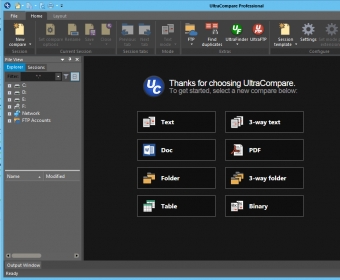
UltraCompare Professional is a useful utility that allows you to compare and merge files, folders, directories and .zip archives. In other words, by using this piece of software, you are able to compare and merge two or three different files at the same time. As a professional tool, this application also supports comparing .zip archives, Word documents, network directories, as well as file synchronizing and duplicate file identifying.
This application allows developers to spare precious time when it comes to files comparison or merge. Moreover, by using this application, one may identify new features of upgrades for previously installed programs. You are further able to easily identify copies of documents or folders, without performing the “classical” time-consuming search. All you have to do in this respect is access the “Find Duplicates” option located under the "File” menu, and then select your desired search criteria. As far as the latter are concerned, there are four options: name, size, dates and content, with the possibility to ignore case or ignore file extension. Also, you can compare previous backups with the current one, so as to be sure that no files were lost.
Despite its wide variety of features, this piece of software is simple to use, addressing both experienced computer users and novices. Furthermore, its graphics are quite simple, probably because UltraCompare Professional's developers focused mainly on its functionality, rather than on its appearance. All of these details recommend the program as one of the most reliable tools available for its designated purpose.
Easy to use
FTP directory compare
Allows two or three files compare at the same time
The installation process might take a little long.
Reviewed by: Marius Viezure
Reviewer rating:
Reviewed: 3 months ago
What's new in version 8.2
New in v8.20: Integrated Online help Landscape printing New parsing options for DOC/RTF/PDF Improved Folder sync between local and remote Optimized FTP delete/merge functionality (delete/merge now occurs directly on server) Support for multi-GB binary file compare Maintenance installment: Improved PDF compare performance and stability Improved handling of long lines when printing Empty folders no longer show "+" (expand) symbol Improved functionality of file/folder path auto-complete Resizable toolbar customization dialog Tooltips now accommodate very long file paths/names Increased file name character limit in result report Relative paths now supported on command line Miscellaneous improvements to file change detection Fixed issues related to special character differences Command line compare now respects "Specify Extensions" setting UC releases locks on compared folders after compare session is closed Fixed issue where merging line(s) inserts hex nulls into file Better alignment of compare when blank lines are at end of file Corrected issues related to SFTP connections requiring a public key Addressed Preview First / Second display issue on XP Orphan folders are now properly deleted in folder sync mode Fixed Find Duplicates issues in localized versions Many other miscellaneous improvements and fixes
What's new in version 5.1
Compare text snippets, Save As dialog, multi-line merge in Line Mode Merge, character-to-character line comparison, Customize display of timestamps, Ignore file timestamp differences in folder compare, Option to use registry/INI file for settings, Other performance improvements